Finance Leadership Without the Spreadsheet Rebuild
In most small companies, the monthly management report is a workbook somebody reassembles by hand: export the P&L, paste the balance sheet, recalculate the ratios, retype the commentary, then hope nothing changed in the books afterwards. It is slow, it drifts out of date the moment a late bill is entered, and nobody can say with confidence which version the board actually saw.
The CFO / Boardroom Center replaces that routine with one section of BizBooks Pro, built directly on GAAP-compliant double-entry bookkeeping. Every number on every tab is computed from your general ledger, so there is nothing to export and nothing to reconcile. Ten tabs sit side by side — Overview, Cash Forecast, Scenarios, Budget vs Actual, Covenants, Risk, Profitability, Close, Tax Reserve and Boardroom — each answering one question a finance lead is expected to answer every month.
Built For the People Who Answer to a Board or a Bank
One Quarter at Harbor Light Coffee Co.
The setup. Harbor Light is a specialty roaster with $225,750 of September revenue and a $50,000 line of credit from First National Bank. The loan agreement requires a debt service coverage ratio of at least 1.25× and a minimum cash balance of $150,000, tested quarterly. Dana, the owner, has a three-person board; Marcus, a fractional CFO, works with her two days a month from his own office.
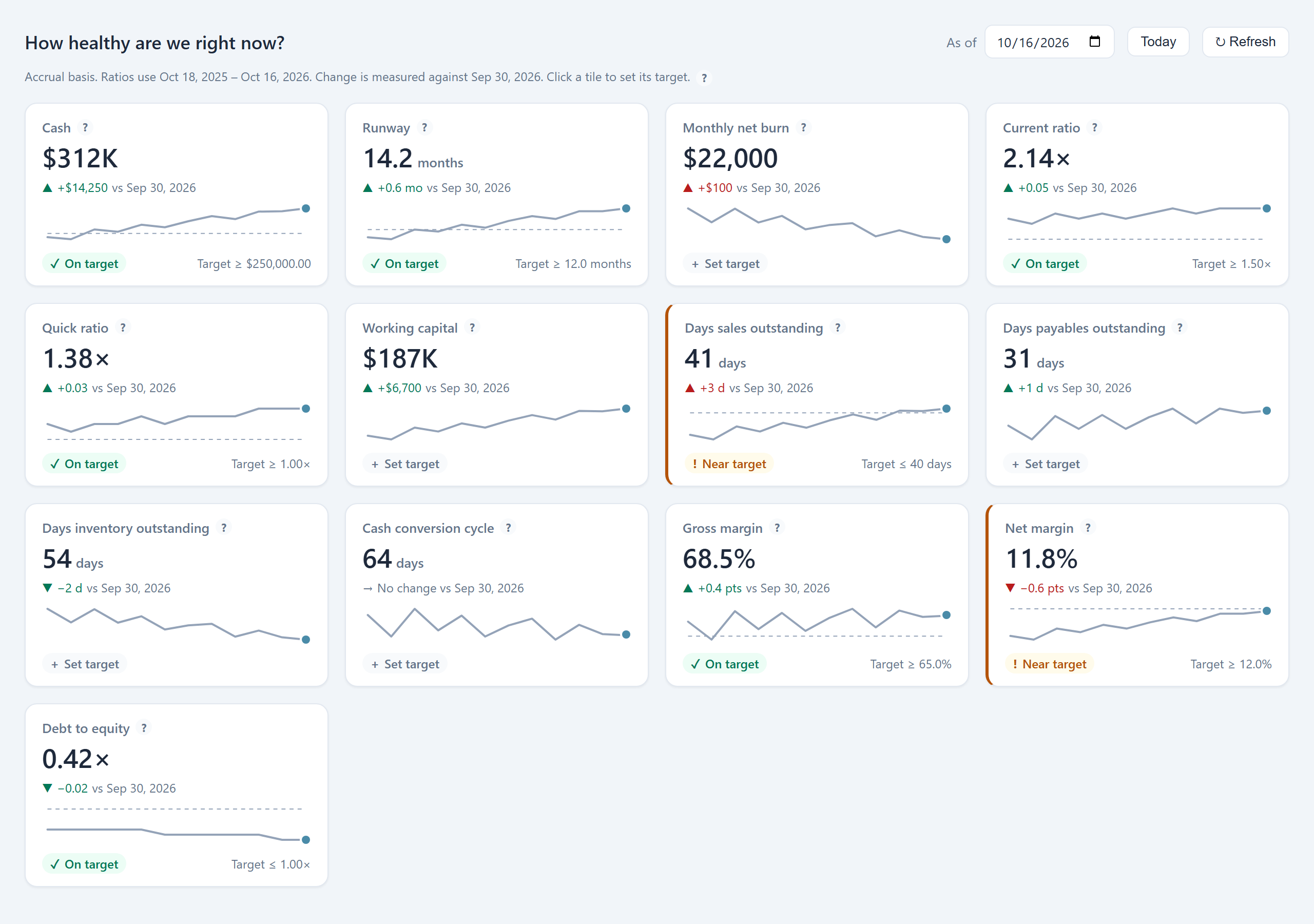
Monitoring. Marcus enters both covenants once. The Covenants tab now shows headroom every day rather than once a quarter: cash of $312,400 sits comfortably above the floor, but when receivables climb to 41 days outstanding, the Overview flags DSO as near its 40-day target before it ever threatens the coverage ratio.
Deciding. Dana wants to hire two roasters at $9,500 a month each. In Scenarios, Marcus layers that hire onto the 13-week forecast alongside a 5% price increase, and the side-by-side comparison shows the cash low point, runway and profit under each case before anyone signs an offer letter.
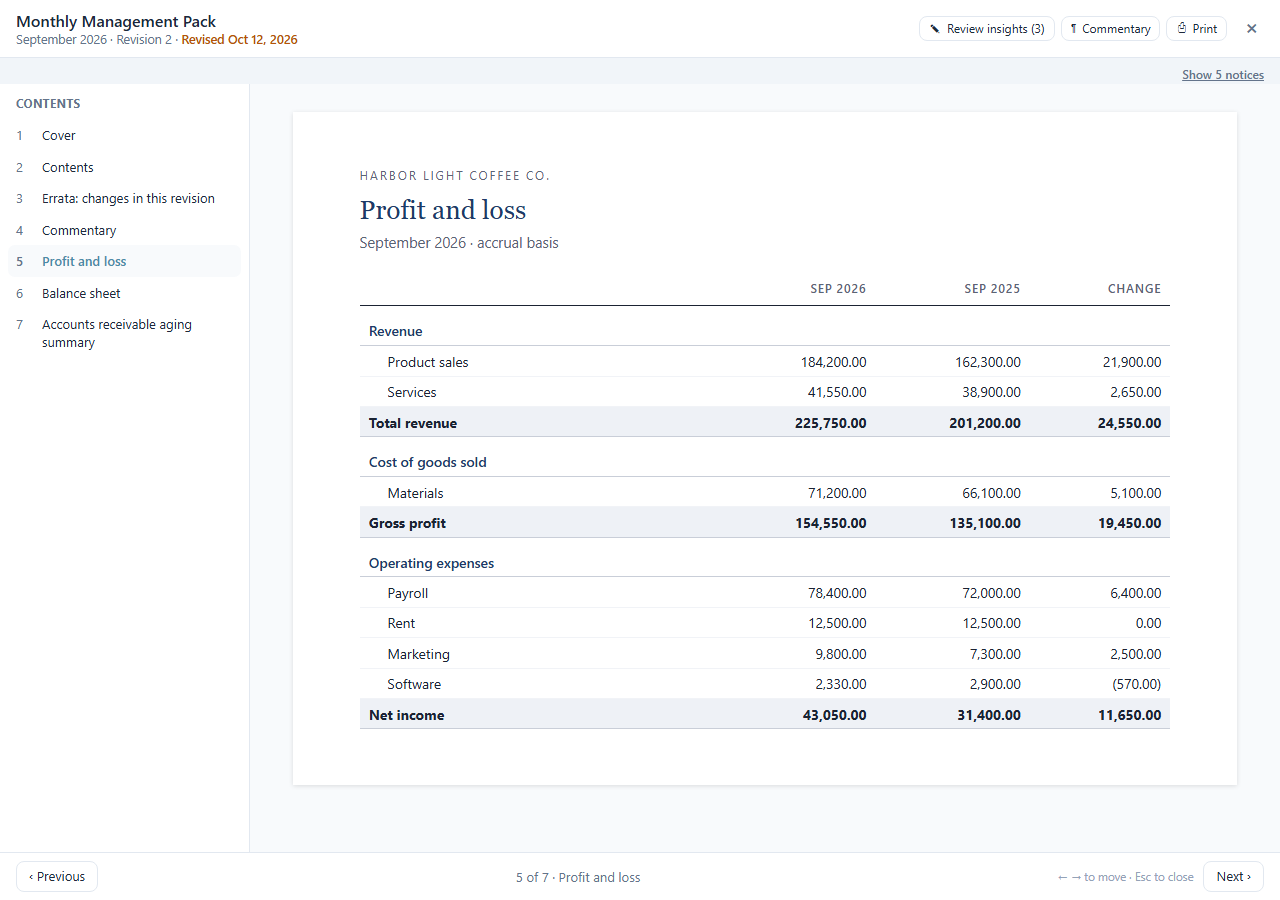
Reporting. The Quarterly Board pack generates itself on October 15. Marcus reviews the Kantivo Core AI insights, edits one, writes the commentary page, and shares a PIN-protected link with the three directors. When a late supplier credit arrives on the 18th, the pack warns that its data has changed; one click produces Revision 2, with an errata page showing net income moving from $42,180 to $43,050. The directors’ link opens the new revision automatically, under a Revised banner.
The Ten Tabs
📊 Overview — a KPI cockpit with targets
Thirteen tiles cover liquidity, efficiency and profitability: cash, runway, monthly net burn, current ratio, quick ratio, working capital, days sales outstanding, days payables outstanding, days inventory outstanding, the cash conversion cycle, gross margin, net margin and debt to equity. Each tile shows its movement since the prior month-end, a 12-month sparkline and an optional target. A tile that slips past its target is marked Near target or Off target — in words, never colour alone — and raises a badge on the sidebar item so you notice without opening the page. Every tile explains exactly how it is calculated.
💵 Cash Forecast — thirteen weeks ahead
The rolling 13-week forecast projects your bank balance from open invoices, open bills, recurring transactions and any adjustments you add, timed by each customer’s actual payment history rather than invoice due dates. Weeks that fall below zero or below your safety floor are flagged in advance. More on cash flow forecasting →
🔀 Scenarios — test the decision first
Build named what-if cases on top of the forecast: new hires, a price increase or cut, losing a particular customer, new revenue, a change in an expense category, taking on a loan, customers paying late, or a one-off purchase. Each case reports its effect on closing cash, the cash low point, runway and profit, and up to three cases can be compared side by side against the base forecast. Nothing in a scenario touches your books. Loan repayments separate interest from principal, so only the interest reaches profit.
🎯 Budget vs Actual — variances with an explanation
Compare results with your budget by account, and attach a comment to any variance that crosses your threshold. Those comments travel with the numbers into board packs, so the explanation is written once, where the variance is.
🛡️ Covenants — know your headroom before the bank does
Record each loan covenant — debt service coverage, fixed-charge coverage, current ratio, debt to equity, minimum cash and similar tests — with its lender, threshold and test schedule. BizBooks Pro measures each one from your books, shows the headroom remaining, and warns when that headroom falls inside the margin you choose, while there is still time to act. A covenant compliance certificate is ready for the lender package. Where a metric depends on accounts BizBooks Pro cannot identify with certainty, such as interest or loan principal, it shows its assumptions for you to confirm rather than guessing silently.
⚠️ Risk — where the business is exposed
See how much revenue depends on your largest customer and on the top five and top ten; how much you rely on any single vendor; how receivables are ageing and how much you can realistically expect to collect in the next 30, 60 and 90 days; and a list of unusual transactions worth a second look, such as a bill that appears to be entered twice. Flags can be dismissed once reviewed, and Kantivo Core AI can add a short reading of the pattern on request.
🥧 Profitability — margin by any dimension
Break revenue, cost and margin down by class, location, customer, product or project, using the tracking you already record on transactions. Totals tie back to the income statement, so the slices always add up to the whole.
✅ Close — a month-end checklist that checks itself
Each month gets a checklist with an owner and due date for every task. Where a task can be verified from the books — bank accounts reconciled, Undeposited Funds cleared, no unbalanced or draft entries, the balance sheet in balance — BizBooks Pro runs the check every time you open the list and shows whether it passes. When the list is complete, sign off and lock the period so nothing posts into a finished month. A history shows when each month was closed and by whom, and any later change to the lock date is written to the audit log.
🏦 Tax Reserve — an estimate, not tax advice
A running estimate of income tax on profit to date, set against what you have actually put aside in a reserve account and paid in estimated payments, with the quarterly due dates for your entity type and the shortfall or surplus at each one. It handles corporations and pass-through entities differently, and it is labelled as an estimate on every screen. It is a planning aid; confirm figures and dates with your tax adviser.
🏛️ Boardroom — report packs, start to finish
The tab that gives the Center its name. It is covered in detail below.
Boardroom: Board Packs That Assemble Themselves
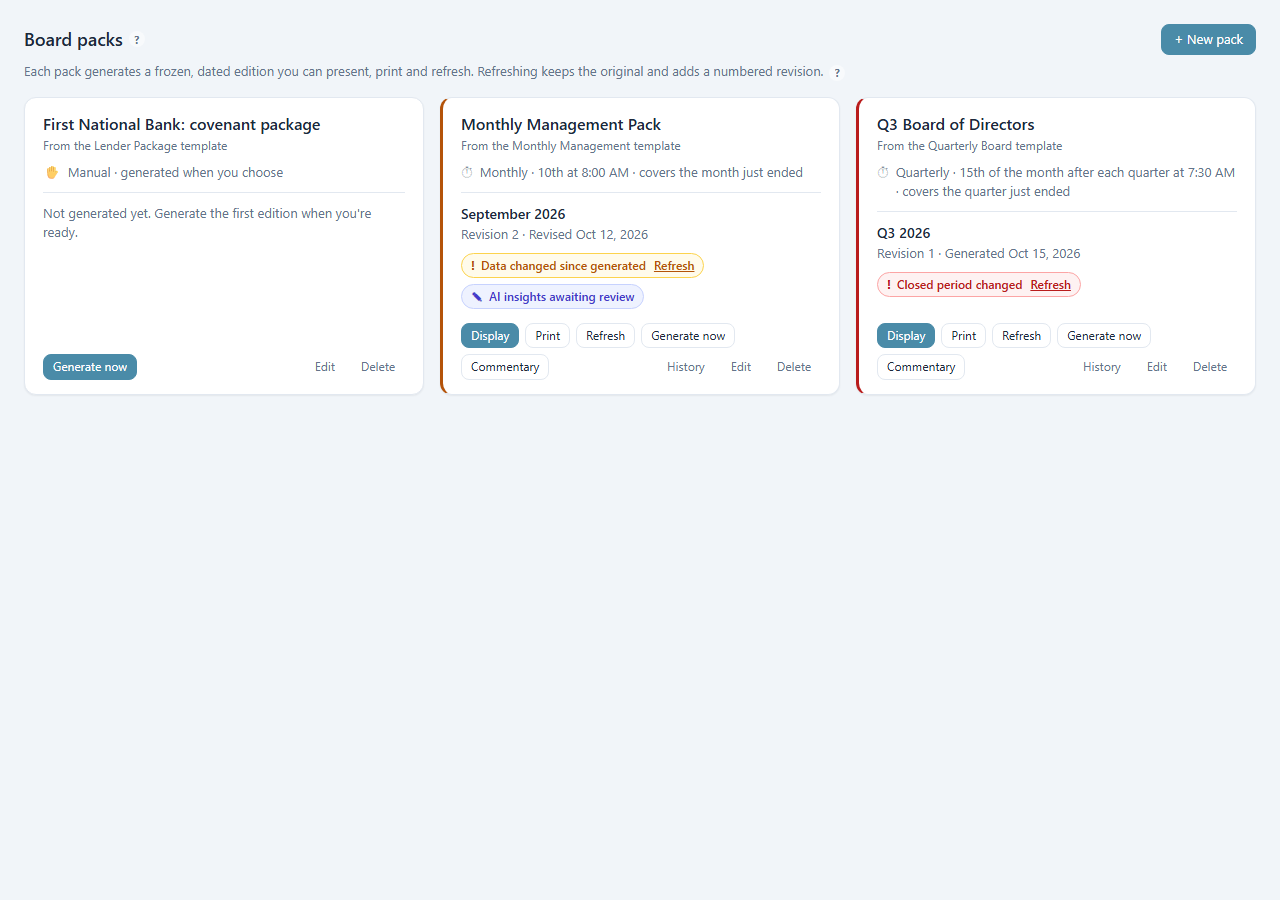
A board pack is a saved selection of reports with a cover, a contents page and your branding. Each time it runs, it produces a frozen, dated edition — so what the directors were shown in October can be reproduced exactly in March.
📑 Three ready templates
Start from a template and change anything afterwards.
- Monthly Management: KPIs, P&L vs budget, balance sheet, cash flow, 13-week forecast, AR aging
- Quarterly Board: commentary, KPIs, comparative P&L, balance sheet, cash flow, covenants, risk
- Lender Package: balance sheet, P&L, AR and AP aging, covenant compliance certificate
- Or begin with a blank pack and choose every report
🤖 Insights you approve
Kantivo Core AI can write a short observation for each report. Every insight stays a draft until you review it.
- Edit, delete or approve each insight
- A pack cannot be shared until its insights are reviewed
- Add a commentary page in your own words, like an MD&A
- AI can be switched off for any pack or report
🗓️ Generated on a schedule
Set a pack to run weekly, monthly, quarterly or yearly, on the day and time you choose.
- Covers the period just ended by default
- An in-app notice and badge when an edition is ready
- Runs while BizBooks Pro is open; a missed run is produced at next launch
- Generate now at any time, schedule or not
🖥️ Present or print
Two ways to put the pack in front of people.
- Display: full screen, one report per page, with a contents list and arrow-key navigation for the meeting-room screen
- Print / PDF: cover, contents and page numbers, with your confidentiality line in the footer
- Every earlier edition stays in the history
Revisions that keep the record straight
Books change after packs go out: a late invoice, an adjusting entry from the year-end review, a correction. Each edition stores a fingerprint of the transactions in its period, and if any of them is added, edited or deleted afterwards, the pack says so. If the period had already been locked in Close, the warning is shown in red, because closed books moving is something a CFO needs to know.
Refresh regenerates the edition for the same dates with current data and saves it as Revision 2 (then 3, and so on). Revision 1 is never overwritten. The new revision opens with a “what changed” page listing every headline figure that moved, old value and new, and carries a Revised stamp on its cover and footer. Nothing refreshes on its own; you decide when a revision is warranted.
Sharing with directors and lenders
A desktop application cannot serve a web page to a director’s phone, so sharing works by uploading a frozen, read-only copy of that one pack — never your company file or live data — to our relay, encrypted at rest. You get a link and a QR code to send or print on the cover.
- Optional PIN of 4 to 8 digits, with lockouts after repeated wrong attempts
- Expiry of 7, 30 or 90 days, or none
- Follows the newest revision by default, showing viewers a Revised banner with the change summary; a link can also cover the whole pack so one QR code serves every meeting
- Revoke any link instantly, or extend it
- View log showing when each link was opened and on what kind of device; no viewer identity is collected
- Shared pages are marked noindex, so search engines never list them
How a Board Pack Comes Together
Create the pack
Pick a template, name the pack, choose the period and comparatives, and reorder the reports.
Set the schedule
For example, monthly on the 10th at 8:00 AM, covering the month just ended.
Review and comment
When the edition is ready, approve or edit the AI insights and write the commentary page.
Present, print or share
Display it full screen in the meeting, print a PDF for the minute book, or send a PIN-protected link.
Refresh if the books move
Generate Revision 2 with its errata page; shared links pick it up automatically.
Access, Roles and Remote Work
Administrators and the owner see the whole Center. A dedicated CFO Center permission lets you open it to a controller or finance manager without granting full administrator rights; staff without that permission do not see the menu item. An outside CFO or accountant who holds their own BizBooks Pro licence can work in the Center remotely through accountant remote access, the same secure connection used for client books.
Frequently Asked Questions
Which plans include the CFO / Boardroom Center?
Professional and every plan above it, including the Accountant, Enterprise, Nonprofit and Government plans. On Basic the menu item is visible but locked, and opening it explains what an upgrade adds.
Does sharing a board pack put my company file in the cloud?
No. Only a frozen, read-only copy of the pack you chose to share is uploaded, encrypted at rest. Your company file and live ledger stay on your own computer. Snapshots are deleted 30 days after a link expires or is revoked.
Can our outside CFO use it without being in the office?
Yes. A fractional CFO or accountant with their own BizBooks Pro licence can work in the Center over accountant remote access. For an in-house controller, grant the CFO Center permission instead of full administrator rights.
Do scheduled packs run if the computer is off?
Scheduled runs happen while BizBooks Pro is open, because your books live on your own machine. If a run date passes while the program is closed, the edition is produced at the next launch and a notice tells you so.
Is the tax reserve figure tax advice?
No. It is a planning estimate based on profit to date and the rate you set, labelled as an estimate on every screen. It does not model loss carryforwards or every safe-harbor rule, so confirm amounts and due dates with your tax adviser.
What happens if the books change after a pack goes out?
The pack shows a warning that its data has changed. Refresh produces Revision 2 for the same dates, with a page listing every figure that moved and a Revised stamp, while Revision 1 is kept exactly as the board saw it.
Do I have to use the AI insights?
No. Insights can be switched off for a whole pack or for individual reports. When they are on, nothing an AI wrote reaches a director until you have reviewed it.